US30 COPILOT · DATA ENGINE

Market intelligence.
Not another signal app.

One decision engine combining your live technical feed, macro context and optional futures/order-flow confirmation.

Decision-support software · no automatic trade execution · confidence is an engine score, not a guaranteed probability.
US30 COPILOT
REAL-TIME DATA ENGINE
BETA
NOT CONNECTED
WAITING FOR YOUR DATA FEED
WAIT
Data engine standby
Connect TradingView to begin continuous analysis.
0
ENGINE SCORE
Price
—
Entry zone
—
Invalidation
—
Target 1
—
Target 2
—
Market structure
STANDBY
Macro / event risk
STANDBY
YM direction
STANDBY
YM L1 order flow
STANDBY
Timeframe agreement
—
WHY THE ENGINE IS HERE
Waiting for live market structure, momentum, volatility and context.
COPILOT READINESS
WAIT
0 / 100
The engine will explain why a setup is or is not ready.
Active strategy
Current trade
IDLE
No live trade.
Live P/L
—
LIVE MARKET MAP
US30 price action + Copilot levels
Waiting for candle history…
Waiting for TradingView candle history…
● EMA 20● EMA 50Copilot overlays appear only when a directional setup exists: entry zone · invalidation · TP1 · TP2.
OPPORTUNITY ENGINE

Qualified setups, not noise.

Copilot separates direction, readiness and execution timing.
Current opportunity
WAIT
No live opportunity yet.
STRUCTURE
Multi-timeframe market direction
—
CONTEXT
Macro / economic event risk
—
FUTURES CONFIRMATION
YM cross-market confirmation
—
ENTRY READINESS
Is the setup ready now?
—
COPILOT PRINCIPLE

Direction is not entry timing.

The engine may hold a directional bias while still telling you to WAIT. That separation is deliberate: it reduces chasing and turns the dashboard into decision support rather than a stream of raw signals.

CURRENT ENGINE EXPLANATION
Connect your data feed to populate this panel.
LIVE TRADE COPILOT

From entry to exit.

Once you're in, Copilot stops hunting and starts protecting the position.
Position state
IDLE
No active trade.
R multiple
—
Entry
—
Current
—
Stop
—
TP1
—
TP2
—
Trade health
No position being monitored.
ENGINE VALIDATION

Measure the engine, don't believe the marketing.

Engine validation is automatic and independent of whether you personally take a trade. Results are separated by strategy.

Engine tracked
0
Engine closed
0
TP1 hit rate
—
Expectancy
—
Manual live trades
0
Accepted with LIVE TRADE
0
Manually tracked closed

Manual live-trade tracking is separate from engine validation and begins only when you press LIVE TRADE and confirm your actual entry.

Validation status
BUILDING SAMPLE

Confidence scores become meaningful only after enough closed engine setups. Sample size is shown before any performance claims.

SUBSCRIPTION REQUIRED

Reactivate to manage data connections.

Your TradingView webhook and provider credentials are unavailable while BETA access is inactive.

DATA CONNECTIONS

Your data. One intelligence layer.

Each account gets a private TradingView webhook. Optional provider keys are encrypted at rest using your server APP_SECRET.
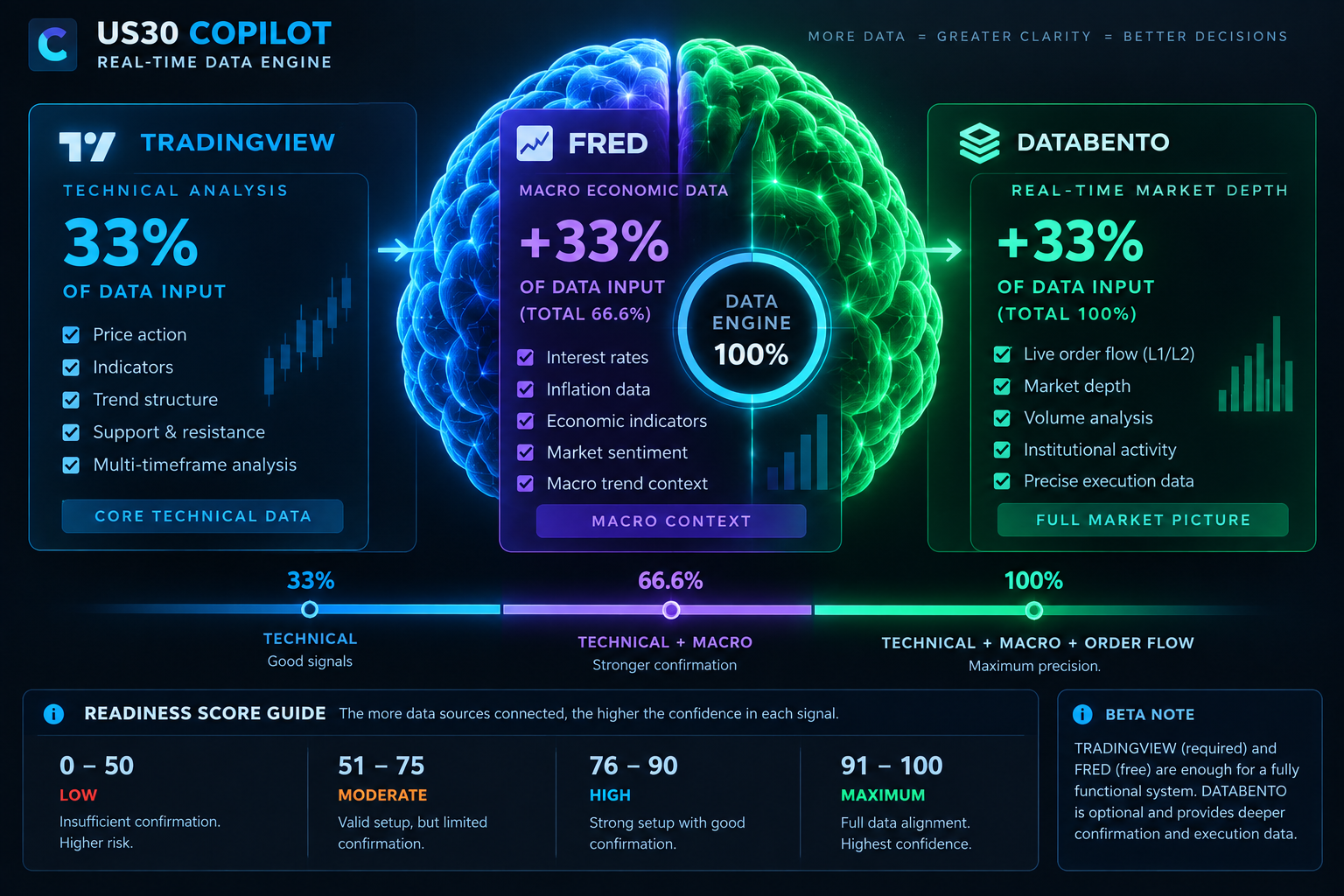
US30 Copilot data brain
33.3%INPUT COVERAGE
COPILOT DATA BRAIN

TECHNICAL CORE

TradingView powers the core technical engine. Add the free FRED key for macro context; Databento adds the final L1 order-flow confirmation layer.
TradingView · 33.3%Technical structure + multi-timeframe analysis
FRED · +33.3%Free macro + rates context
Databento · +33.4%Optional YM L1 order-flow confirmation
Input Coverage is not Trade Readiness. More connected sources increase confirmation depth; the engine still waits for a qualified market setup.
TradingView
PERSONAL WEBHOOK
Loading…
Primary live technical / multi-timeframe feed.
FRED Macro
OPTIONAL · FREE KEY
Rates and macro-regime context.
Databento
OPTIONAL · LICENSED L1
Prepared for licensed CME L1 order-flow confirmation.
TRADINGVIEW SETUP WIZARD

Connect in five steps

The webhook is the destination. The Pine feed calculates and sends the actual market-data packet.

NOT VERIFIED
1
Choose your TradingView feed
Standard works without a CME subscription. CME Enhanced includes live CBOT E-mini Dow (YM) confirmation when the customer has TradingView CME data.
Standard
US30 multi-timeframe feed
CME Enhanced
US30 + YM futures confirmation
Download Pine code
2
Install the Pine feed in TradingView
The download does not auto-install into TradingView. Open the exact US30/Dow chart, set it to 1 minute, open Pine Editor → New blank indicator. Open the downloaded Pine file in a text editor, copy the entire file from line 1 (it must start with //@version=6), paste it into Pine Editor, Save, then Add to chart.
Tip: use this button to avoid broken or partial copy/paste.
3
Create one TradingView alert
Condition: select the Copilot Pine script. Underneath select Any alert() function call. Frequency: Once Per Bar Close.
US30 COPILOT 6.4 LIVE FEED → Any alert() function call
4
Paste your personal webhook
Under Notifications enable Webhook URL, paste this private address, and leave TradingView's Message field alone because Pine builds the JSON payload automatically.
Loading…
5
Verify the connection
Create the alert and wait for a completed 1-minute candle. Copilot should then receive a packet automatically.
Waiting for a TradingView packet.
PERSONALISE COPILOT

Only notify what matters.

Trading mode
PHONE / BACKGROUND PUSH
Not enabled on this device.
ACCOUNT
—

Your personal webhook and provider credentials belong to this account only.

BILLING & ACCESS
Checking subscription…
Beta data requirement: Third-party data is not included. You need your own compatible TradingView access and your own Databento subscription/API key. FRED can use a free API key.
PRODUCT POSITIONING
US30 Copilot is a data-engine decision-support product. It explains the inputs and reasoning behind a setup rather than presenting itself as a guaranteed signal service.
COPILOT QUICK START
Welcome to US30 Copilot
C